
It is possible to sign up for roles by clicking on the ‘sign up for roles’ menu on the left hand side, in the ‘My Participation’ tab. You should typically be able to sign up for roles one to two meetings. It is good to aim to do at least two roles between doing prepared speeches.
To sign up for a role, simply click on the green thumbs up button displayed beside each role.
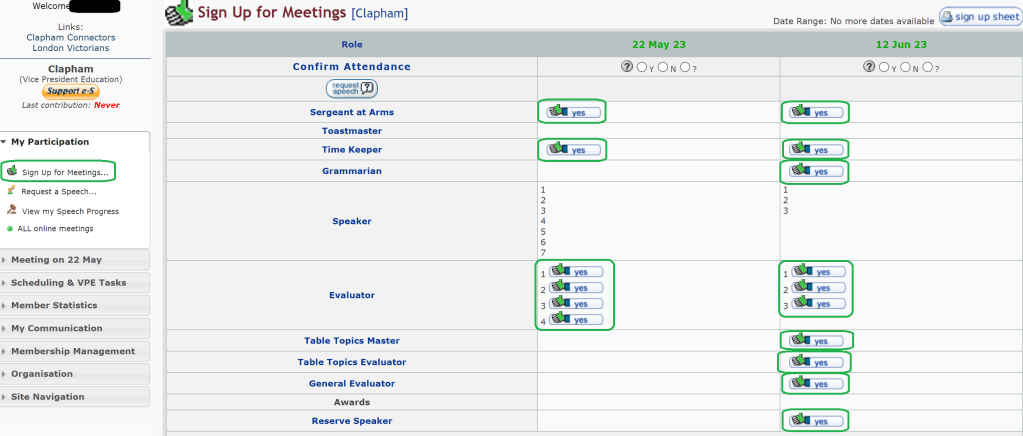
Be aware that signing up for a role at a meeting, automatically confirms your attendance at this meeting. If for any reason you are unable to attend this meeting, please notify us as soon as you can by changing your attendance on the system or on whatsapp.
If you’ve confirmed your attendance and preferred role in the whatsapp group the Vice President for Education will sign you up in easyspeak.
An alternative way to sign up for roles is to navigate to the meeting agenda. Once there, you can select your name from the drop down menu for the role you would like to sign up for and click save, as indicated by the blue boxes.
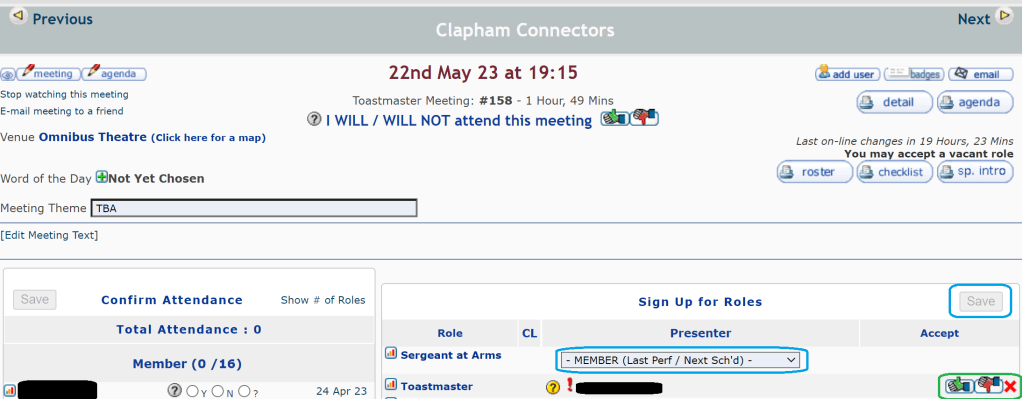
Clicking the green thumbs up will then confirm your role sign up.
 Clapham Connectors